Jumat, 20 Januari 2017

Add a Hibernate button to shutdown screen

For all those who hibernate their pc, this trick comes handy. Traditionally, to hibernate our PC, hold down the shift key on the shut down screen, the Stand by button changes to Hibernate then we click on it. This trick adds a Hibernate button to the Shut down screen. Now you have all four buttons on one shot, no need to press Shift key.

The below pictures will explain more clearly.

Before:-
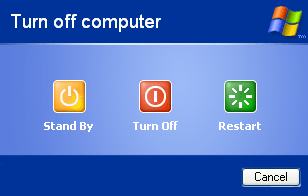


After:-
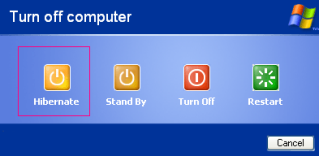
After performing the trick

Steps:-
We have to make some changes to the registry.
As a word of caution, take a back-up of your registry.
Now, To add the button, download show_hibernate.zip and execute the registry file inside it.
To add the button, download hide_hibernate.zip and execute the registry file inside it.

Click to download the documents:


Reblog this post [with Zemanta]

lamsim

About lamsim

Author Description here.. Nulla sagittis convallis. Curabitur consequat. Quisque metus enim, venenatis fermentum, mollis in, porta et, nibh. Duis vulputate elit in elit. Mauris dictum libero id justo.

Subscribe to this Blog via Email :